 Jug Scope
 for shops and A&Ps.
Owners send you their borescope inspections from the app. Your mechanics capture their own. You manage the shop from the app and from a web portal.
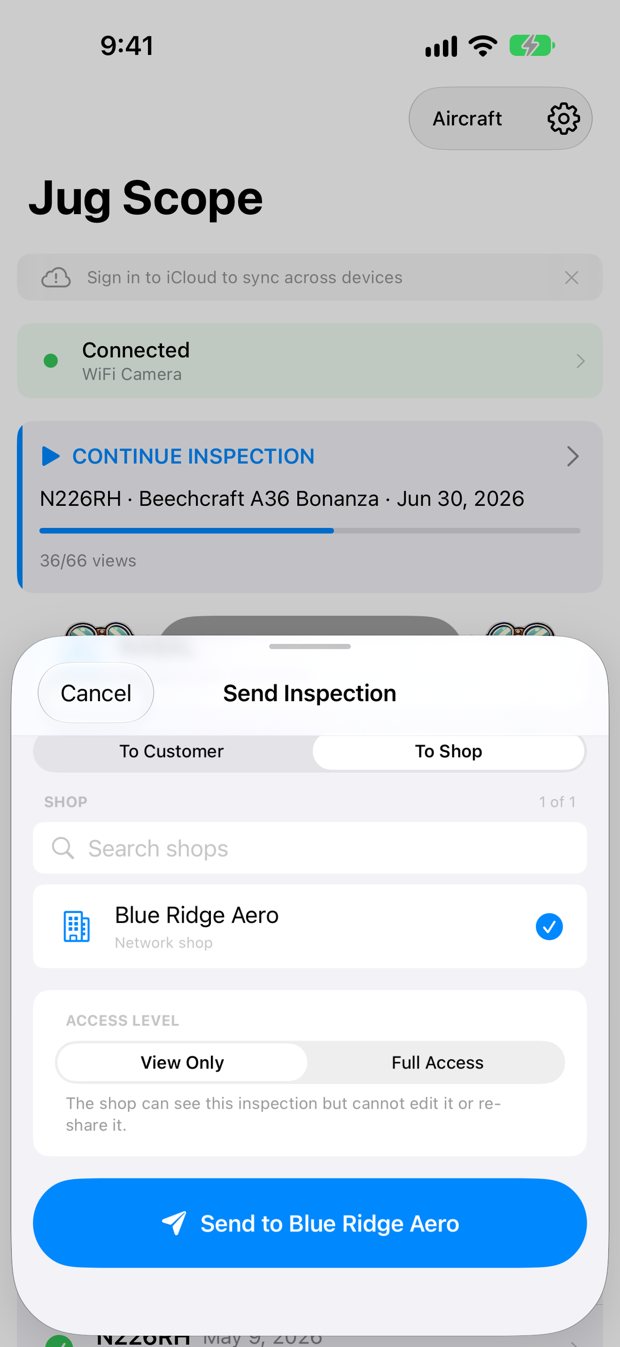
How inspections reach you.
An owner opens a finished inspection in Jug Scope and sends it to your shop. They choose one of two access levels:
- View Only. You can see the inspection but cannot edit it or re-share it.
- Full Access. You can see, edit, and re-share it.
Tip: When you deliver an inspection to a customer, send it as View Only. They get a record they can't change by accident.
You can also send a finished inspection to a customer by tail number and their email or phone. They get a link that lasts 7, 30, 60 or 90 days, as you choose. You or the customer can turn it off at any time. The photos keep their location data.
Set up your shop.
- In the app, create your shop. This needs a Shop plan.
- Invite your mechanics by email, with a link, or with a code.
- Each mechanic opens the invitation in Jug Scope, or enters the code in Settings → Jug Scope Cloud → Join a shop with a code.
- The mechanic reads a 4-digit code to one of the shop's owners, who enters it to approve them. Only that approval adds them to the shop.
- Manage the shop at shop.jugscope.app.
Each mechanic buys their own Owner / Mechanic plan in the app. A mechanic needs it to join the shop and to capture.
The shop portal.
The portal at shop.jugscope.app is where you run the shop from a computer. It has seven sections: Overview, Inspections, Roster, Customers, Aircraft, Delivery, and Billing. Sign in with the same Apple Account you use in the app.
Anyone with an Apple Account can sign in, but the portal shows only the active shops that account belongs to. Every member can view. Changes, and Send in Jug Scope, are for owners only. Shops are created, and invitations accepted, in the app.
If a Shop plan lapses, the shop’s members lose access to the web portal after a 16-day grace period. The app keeps working.
Tip: reloading the page signs you out. Sign in again to carry on.
One plan for the whole shop.
The Shop plan is $29.99 a month or $299.99 a year. It covers one shop, its web portal, and every aircraft the shop works on. A Cherokee today and a Bonanza tomorrow are both covered.
A shop owner can buy inspection credits for the shop in the app. When a member sends an inspection to the shop, it uses one of the shop’s credits, or the member’s own if the shop has none. Sending to your shop isn’t free; it’s paid once, at hand-off. Exporting, sending outside the shop, uploading to Savvy, or creating a customer link needs the inspection unlocked, and once it’s unlocked those are free. Owner approval is an optional shop setting, off by default. If your shop turns it on, the shop is charged only when an owner approves the incoming send, and a declined send costs nothing. A member’s own captures never wait for approval. A shop member’s first send also needs their own Owner / Mechanic plan. Active shop members can view all of their shop’s photos.
Work on your own?
An independent mechanic is a one-person shop and buys the Shop plan. If you work in someone else's shop, join it with a code. You need your own Owner / Mechanic plan to capture.
Got an invitation code?
Open Jug Scope and go to Settings → Jug Scope Cloud → Join a shop with a code. Enter the code and confirm. Then read the 4-digit code on your screen to one of the shop's owners; you join once they approve it. You need an active Owner / Mechanic plan or Shop plan to join.